SIOS SANless clusters

SIOS SANless clusters High-availability Machine Learning monitoring

  • Home
  • Products
    • SIOS DataKeeper for Windows
    • SIOS Protection Suite for Linux
  • News and Events
  • Clustering Simplified
  • Success Stories
  • Contact Us
  • English
  • 中文 (中国)
  • 中文 (台灣)
  • 한국어
  • Bahasa Indonesia
  • ไทย

Demo Of SIOS DataKeeper For A Three-Node Cluster In AWS

January 25, 2023 by Jason Aw Leave a Comment

Demo Of SIOS DataKeeper For A Three-Node Cluster In AWS

The SQL Server 2016 Standard Edition can be limited as it only supports a single database per Availability Group so is best suited to the smallest environments. While the SQL Server Enterprise Edition does come with more features and capabilities, this is also reflected in the cost. However, there are various options for achieving high availability (HA) SQL Server with the Standard Edition.

In this video, Dave Bermingham, our Director of Customer Success, talks about how to configure SQL Server Standard Edition for achieving high availability on AWS. He goes into depth about the challenges people face with the Standard Edition and what options they have. Finally, he gives us a demo of how SIOS DataKeeper can be used for a three-node cluster in AWS, enabling a multi-availability zone cluster as well as a multi-region cluster.

Key highlights from this video interview are:

  • Bermingham discusses how companies can save money by building a SQL Server FCI using SQL Server Standard.
  • Bermingham takes us through the benefits of deploying SQL Server on EC2 and Always On Availability Groups and their benefits.
  • One of the key challenges of building an SQL Server FCI  in any environment is where to run the nodes in different data centers. Bermingham shows what options are there for users.
  • Bermingham compares the features of the SQL Server Standard Edition to the Enterprise Edition.
  • Bermingham takes us through a demo of a three-node cluster in AWS with two nodes in one region spread between two availability zones and a third node in a different region.

Reproduced with permission from SIOS

Filed Under: Clustering Simplified Tagged With: SQL Server Enterprise Edition

2023 Predictions: Data Democratization To Drive Demand For High Availability

January 21, 2023 by Jason Aw Leave a Comment

2023 Predictions: Data Democratization To Drive Demand For High Availability

In this video of 2023 Predictions, our VP of Global Sales and Marketing Margaret Hoagland shares her thoughts on what will happen in the industry this new year.

Hoagland predicts two trends for 2023:

  • Data democratization will drive the need for high availability. As more and more people have access to data and use it in their day-to-day business than ever before, there is a pressing need for high availability.
  • Companies will perform cloud evaluation and reassess their cloud stance. After COVID, there is a need to examine if they want to go back to an on-premise environment or move different workloads in different clouds.

This year, SIOS will continue to focus on

  • High availability, ensuring companies can set up, configure failover, and maintain their systems as cost effective as possible.
  • Cloud enablement and ease of use.
Reproduced with permission from SIOS

Filed Under: Clustering Simplified Tagged With: Cloud, High Availability

Understanding the Complexity of High Availability for Business-Critical Applications

January 17, 2023 by Jason Aw Leave a Comment

Understanding the Complexity of High Availability for Business-Critical Applications

Understanding the Complexity of High Availability for Business-Critical Applications

Minimizing downtime in systems, databases, and applications is the key to maximizing productivity. Modern organizations rely on business-critical systems, databases, and applications—such as enterprise resource planning (ERP), customer relationship management (CRM), e-commerce, financial systems, and supply chain management—to operate efficiently and deliver superior customer experiences. When a system, database, or application fails, high availability protection restores operation to keep the business up and running.

What Is High Availability?

High availability is an attribute of a system, database, or application that is designed to operate continuously and reliably for extended periods. The goal of high availability is to reduce or eliminate planned and unplanned downtime for critical applications by incorporating redundant components and other technologies to address single points of failure in a system, database, or application.

Simply stated, high availability ensures that your system, database, or application operates when and as expected: “when” refers to the percentage of time the system, database, or application must be up and running as expected—meaning that the application operates the way users expect and meets their needs in a timely manner.

IDC Model

Service-level agreements (SLAs) for high availability help ensure that key components of the IT infrastructure are operational and available during business hours. IDC has created an SLA model for high availability that defines five levels with the following uptime requirements:

• AL4 (Continuous Availability—System Fault Tolerance): No user interruption and a total maximum of no more than 5 minutes and 15 seconds of planned and unplanned downtime per year (99.999% or “five-nines” availability).
• AL3 (High Availability—Traditional Clustering): Minimal user interruption and a total maximum of no more than 52 minutes and 35 seconds of planned and unplanned downtime per year (99.99% or “four-nines” availability).
• AL2 (Recovery—Data Replication and Backup): Some user interruption and a total maximum of no more than 8 hours, 45 minutes, and 56 seconds of planned and unplanned downtime per year (99.9% or “three-nines” availability).
• AL1 (Reliability—Hot Swappable Components): All service stops and a total of 87 hours, 39 minutes, and 29 seconds of planned and unplanned downtime per year (99% or “two-nines” availability).
• AL0 (Unprotected Servers): All service stops, and no uptime SLAs are defined.

Your high availability requirements depend on the criticality of the overall system, the application, and numerous other factors, including:
• How critical the applications are to the business
• Whether customers notice an impact
• How often the applications run
• How many users are affected by downtime
• How quickly a database or application must fail over to the redundant system to avoid disruption
• How much data loss is tolerable

Five nines availability is typically reserved for applications that require continuous “stateful” operation. For business-critical applications four-nines availability is standard. Non-critical systems and applications, you may only require two-nines availability. When determining acceptable downtime, it’s important to consider:

• Unplanned downtime (that is, hardware or software failures)
• Planned downtime for routine hardware and software maintenance
• Uptime at the application and database level

Various high availability solutions can help businesses achieve their SLA objectives for different systems, databases, and applications. Although continuous availability (AL4) may seem like the most appropriate goal for business-critical deployments, it’s important to find the right balance between cost and availability. Continuous availability can also have a negative impact on downtime required for planned maintenance as the system generally has to be taken offline when application or OS updates are applied, versus high availability, which typically allows for rolling updates.

High Availability Metrics: RTO vs. RPO

In addition to uptime and availability, Recovery Time Objectives (RTOs) and Recovery Point Objectives (RPOs) are important metrics used to assess high availability (as well as disaster recovery) in a system, database, or application.

RTO is the maximum tolerable duration of any outage. Online transaction processing applications generally have the lowest RTOs, and those that are business-critical often have an RTO of only a few seconds.

RPO is the maximum amount of data loss that can be tolerated when a failure happens. For disaster recovery, a typical RPO for an application and its associated data may be 24 hours. Nightly backups ensure that any changes to data over the past 24 hours can be restored in the event of a disaster. However, for high availability applications and data, the RPO is often zero. That is, there should be no data loss under any failure scenarios.

Traditional Clustering

High availability clusters are groups of server nodes (and other components) that support business-critical applications that require minimal downtime. Clustering software lets you configure your servers as a cluster so that multiple servers can work together to provide high availability and prevent data loss. IT organizations rely on high availability clustering to eliminate single points of failure and minimize the risk of downtime and data loss.

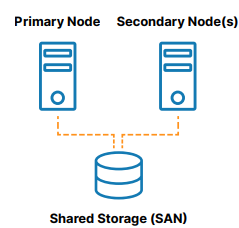
A traditional, on-premises high availability cluster is a group of two or more server nodes connected to shared storage (typically, a storage area network, or SAN) that are configured with the same operating system, databases, and applications (see Figure 1).

Figure 1: Traditional server clustering with shared storage

One of the nodes is designated as the primary (or active) node and the other(s) are designated as secondary (or standby) nodes. If the primary node fails, clustering allows operation of a system, database, or application to automatically fail over to one or more secondary nodes and continue operating as normal with minimal disruption. Since the secondary node is connected to the same storage, operation continues with zero data loss. The benefits of this cluster architecture are reduced downtime, elimination of data loss, and protected data integrity.

However, there are many scenarios in which shared storage is not wanted. A failure in the shared storage will take all of the clusters offline, making it a single point of failure (SPoF) risk. SAN storage can also be costly and complex to own and manage. Lastly, using shared storage in the cloud can add significant, unnecessary cost and complexity. Some clouds do not offer a shared storage option at all.

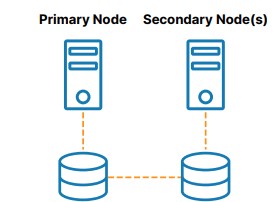
As shown in Figure 2, SANless or “shared nothing” clusters are the best alternative to shared storage. In these configurations, every cluster node has its own local storage. Efficient host-based, block-level replication is used to synchronize storage on the cluster nodes, keeping them identical. In the event of a failover, secondary nodes access an identical copy of the storage used by the primary node. The benefits of this cluster architecture are elimination of a SPoF, elimination of SAN cost and complexity, ease of use and cost savings in the cloud, reduced downtime, and mitigation of data loss.

Figure 2: High availability clustering with SANless or shared-nothing storage

Design Principles

The most advanced high availability clusters incorporate the following design principles:
• They automatically and quickly fail over to a redundant system when an active component fails
• They maintain application-specific best practices during and after the failover
• They provide the ability to manually switchover and switchback to enable efficient testing and “rolling” maintenance with minimal planned downtime
• They can automatically detect failures in network, storage, OS, hardware, or application
• They prevent data loss in the event of a system failure
• They failover across geographically separated nodes for disaster recovery

High Availability Clustering

A variety of clustering software solutions are available for Windows, Linux distributions, and various hypervisors (virtual machine solutions). One group supports only a single operating system, such as the following:
• Windows Server Failover Clustering (WSFC): Provides high availability and disaster recovery for hosted applications such as Microsoft SQL Server and Microsoft Exchange
• SUSE Linux Enterprise High Availability Extension (HAE): Supports clustering of physical and virtual Linux servers with policy-driven clustering and continuous data replication
• Red Hat Pacemaker (Pacemaker): Creates single-site clusters for performance, high availability, load balancing, and scalability

None of the solutions listed here can protect SAP running on Oracle Linux operating system for example. Thus, each solution limits your flexibility and deployment options. More advanced high availability solutions, such as SIOS Protection Suite for Linux, provide application-aware protection in major Linux distributions, including Oracle Linux, Red Hat, and SUSE.

In addition, every application, database, and ERP system has its own requirements for configuration and ongoing management. To meet these requirements, HAE and Pacemaker typically require a high degree of technical skill, and complicated manual scripting, which introduces the likelihood of human error and unreliable failover.

Some examples of business-critical applications, databases, and ERP systems commonly protected with failover clustering include SAP S/4HANA, SQL Server, and other applications and databases.

SAP S/4HANA

Several Linux vendors offer open source high availability extensions for SAP in their “Enterprise for SAP” subscriptions. SAP S/4HANA environments comprise multiple services such as ABAP SAP Central Service (ASCS), Evaluated Receipt Settlement (ERS), and other SAP components, that need to be maintained in the right locations and started up in the right order. In open source clustering products, such as SUSE HAE and Red Hat Pacemaker, manually configuring and managing clusters in these complex environments can be time-consuming and prone to human errors that increase the risk of catastrophic downtime and data loss.

Specific deep expertise in the applications and database is also required to create an application-aware high availability solution. In contrast, SIOS Protection Suite for Linux includes application recovery kits for SAP and HANA that ensure failovers maintain application best practices.

SAP also offers HANA System Replication, a feature that comes with the HANA software. It provides continuous synchronization of an SAP HANA database to a secondary location in the same data center, at a remote site, or in the cloud. The data is replicated to the secondary site and preloaded into memory. When a failure occurs, the secondary site takes over without a database restart, which helps to reduce the RTO. However, failback to the primary node must be manually triggered. HSR needs to be paired with an application-aware clustering software such as SIOS Protection Suite that can detect failures and orchestrate failovers if necessary.

SQL Server

Many companies rely on SQL Server as the back-end database for key applications supporting important business functions. Microsoft WSFC is commonly used to support Always On Availability Groups (AG) and SQL Server Failover Cluster Instances (FCI) for SQL Server applications.

However, WSFC with AG requires costly SQL Server Enterprise Edition licensing. In addition, With FCI, the entire instance is failed over to the standby node. With AG only the databases in the group are protected.
Using SIOS DataKeeper with WSFC allows you to provide advanced high availability protection for SQL Server using cost-efficient Standard Edition licensing.

Other Applications and Databases

SIOS software can be used to protect a wide range of business-critical applications, databases and ERPs, including Oracle, MaxDB, MySQL, PostgreSQL, and DB2. SIOS software enables clustering and disaster recovery.

In our next blog, we’ll take a look at specific industry use cases to help you understand how different businesses achieve high-availability for their mission-critical applications.

Reproduced with permission from SIOS

Filed Under: Clustering Simplified Tagged With: High Availability

Epicure Protects Business Critical SQL Server with Amazon EC2 and SIOS SANLess Clustering Software

January 13, 2023 by Jason Aw Leave a Comment

Epicure Protects Business Critical SQL Server with Amazon EC2 and SIOS SANLess Clustering Software

Epicure Protects Business Critical SQL Server with Amazon EC2 and SIOS SANLess Clustering Software

SIOS DataKeeper Cluster Edition Software Provides High Availability and Disaster Protection.

Epicure, Canada’s leading direct sales company, sells healthy, easy-to-prepare food products through a network of over 16,000 consultants. The company relies on two websites for its critical business operations. Their public website provides company and product information, recipes, blogs, and enrollment information to its customers and to people interested in becoming a consultant. Their internal website provides consultants with important information about products and enables them to place all of their orders. “Our websites are vital to our business,” said Russell Born, Senior Network Infrastructure Administrator at Epicure.

The Environment

Both of Epicure’s websites run on a single server using two instances of SQL Server Standard Edition—one for each website. As the company expanded its products and services, the Epicure IT department needed to update and to ensure both of its business-critical websites would continue to operate in the event of failures or disasters. They decided to move both websites from a third-party hosted facility to its on-premises data center and to use Amazon Web Services EC2 cloud for disaster recovery. “By bringing the sites in-house, we could ensure that our websites would deliver excellent user experiences for both our customers and consultants as our business continues to grow,” said Born.

The Challenge

As part of this website update process, Epicure IT staff wanted an efficient, cost- effective way to provide high availability and disaster protection for both websites while continuing to run them on two instances of SQL Server Standard Edition.

“We didn’t want the added expense of moving to SQL Server Enterprise Edition if we could provide HA and DR with the more cost- effective Standard Edition,” Born said.

The Solution

Using SIOS DataKeeper Cluster Edition software, Epicure IT staff created a two-node SANLess cluster in an active-passive failover configuration that enables each SQL instance to failover independently. One cluster node is in the Epicure on-premises data center and the second node is in an instance of the AWS EC2 cloud. Epicure IT staff created the SIOS SANLess clusters and configured them using the software’s intuitive graphical user interface.

The Results

The SIOS software provided Epicure with an easy, cost-efficient way to provide HA and DR protection for its business-critical SQL Server applications without the cost and complexity of building out a remote DR site or purchasing costly SAN storage or SQL Server Enterprise Edition licenses. “The SIOS software has allowed us to create a hybrid solution that provides the cost savings of running on-premises and the reliability and flexibility of running in the cloud,” said Born. “Because we know that if there is a website outage, it will failover automatically, our IT team can now focus their attention on other priorities to strengthen our business.”

Reproduced with permission from SIOS

Filed Under: Clustering Simplified Tagged With: AWS EC2, cluster quorum, SIOS Datakeeper, SQL Server

SIOS DataKeeper Clustering Software Enables Gulliver International to Move Internal IT Systems to Amazon Web Services Safely

January 10, 2023 by Jason Aw Leave a Comment

SIOS DataKeeper Clustering Software Enables Gulliver International to Move Internal IT Systems to Amazon Web Services Safely

SIOS DataKeeper Clustering Software Enables Gulliver International to Move Internal IT Systems to Amazon Web Services Safely

SIOS software provides high availability in AWS environments, enabling leading pre-owned vehicle company to move all IT system to the cloud.

Gulliver International is a leading pre-owned car company based in Tokyo with 420 locations throughout Japan. Over the next four years, the company plans to expand into a global business with 1600 stores worldwide. To ensure its IT infrastructure can accommodate this rapid growth, the company is migrating all of its internal systems to AWS and promoting a company-wide “cloud-first” policy for all new applications.

“Moving our systems to the cloud will give us flexibility and scalability we need to grow quickly and cost-efficiently, while continuously providing excellent service to our customers,” said Manabu Tsukishima, IT Manager, Gulliver International.

The Challenge

To ensure the success of their cloud-first initiative, Gulliver needed to protect their business critical applications from downtime in a cloud environment, where traditional failover clusters are not possible.

“We would not consider moving our applications to the cloud without an efficient, easy-to-implement high availability solution,” said Tsukishima. Gulliver chose to use SIOS DataKeeper software, which is sold in Japan by SIOS Technology, Inc.

The Solution

SIOS DataKeeper software enables Gulliver to use Windows Server Failover Clustering (WSFC) to build a failover cluster in a cloud environment, where traditional shared- storage clusters are not possible.

SIOS software uses efficient, real time replication to synchronize storage between servers operating as a WSFC cluster in an AWS environment.

Using SIOS software, Gulliver can configure two servers operating as a cluster across separate Amazon Availability Zones.

Just as in a traditional physical environment, if there is a failure on the primary server in the AWS cloud within one Availability Zone, WSFC moves the application to the second server located in another Amazon Availability Zone, providing full disaster tolerance and recovery in the cloud.

The Results

“We are extremely pleased with the value that SIOS DataKeeper software brings to our company’s cloud-first initiative,” said Tsukishima. With SIOS DataKeeper software, Gulliver can move to the cloud without adding complexity or disruption to existing operations.

“By enabling us to use a clustering configuration in the cloud in the same way we would in a physical environment, SIOS DataKeeper software made it possible for us to migrate to AWS without sacrificing application protection or changing the configuration of our existing system at all.”

About 30 percent of Gulliver’s existing on-premises systems have been migrated to AWS without any changes to the company’s system administration or added complexity.

As Gulliver continues to execute its expansion plan, it will soon need to protect even larger volumes of data and a wider range of applications. To meet thi s need, it will continue to use SIOS DataKeeper software as it migrates systems to the cloud. As a Standard Consulting Partner of APN (AWS Partner Network), SIOS is committed to continuing to provide high availability systems that operate on AWS.”

Reproduced with permission from SIOS

Filed Under: Clustering Simplified Tagged With: AWS EC2, Cloud, cloud migration, cluster quorum, SIOS Datakeeper

  • « Previous Page
  • 1
  • …
  • 39
  • 40
  • 41
  • 42
  • 43
  • …
  • 113
  • Next Page »

Recent Posts

  • Broadcom/VMware: Time To Decouple High Availability From Your Hypervisor
  • How To Improve Customer Satisfaction in Technical Support
  • Keeping Buildings Safe: High Availability in Maintenance and Security Systems
  • Designing High Availability Through Modularity and Abstraction
  • The Critical Role of QA and Production Environments in High Availability

Most Popular Posts

Maximise replication performance for Linux Clustering with Fusion-io
Failover Clustering with VMware High Availability
create A 2-Node MySQL Cluster Without Shared Storage
SAP for High Availability Solutions For Linux
Bandwidth To Support Real-Time Replication
The Availability Equation – High Availability Solutions.jpg
Choosing Platforms To Replicate Data - Host-Based Or Storage-Based?
Guide To Connect To An iSCSI Target Using Open-iSCSI Initiator Software
Best Practices to Eliminate SPoF In Cluster Architecture
Step-By-Step How To Configure A Linux Failover Cluster In Microsoft Azure IaaS Without Shared Storage azure sanless
Take Action Before SQL Server 20082008 R2 Support Expires
How To Cluster MaxDB On Windows In The Cloud

Join Our Mailing List

Copyright © 2026 · Enterprise Pro Theme on Genesis Framework · WordPress · Log in